Desktop only

Football Scout Report Builder

Create professional player scouting reports in minutes. Drag-and-drop editor with radar charts, statistics, and PDF export. Trusted by scouts and analysts worldwide.

Create a report with your own player data

Rename Report

Radar Charts

Visualize player attributes with customizable radar charts

Multi-Page Reports

Create up to 10-page reports with our Canva-style editor

PDF & PNG Export

Export high-quality reports ready for sharing

Frequently Asked Questions

What is a football scouting report?

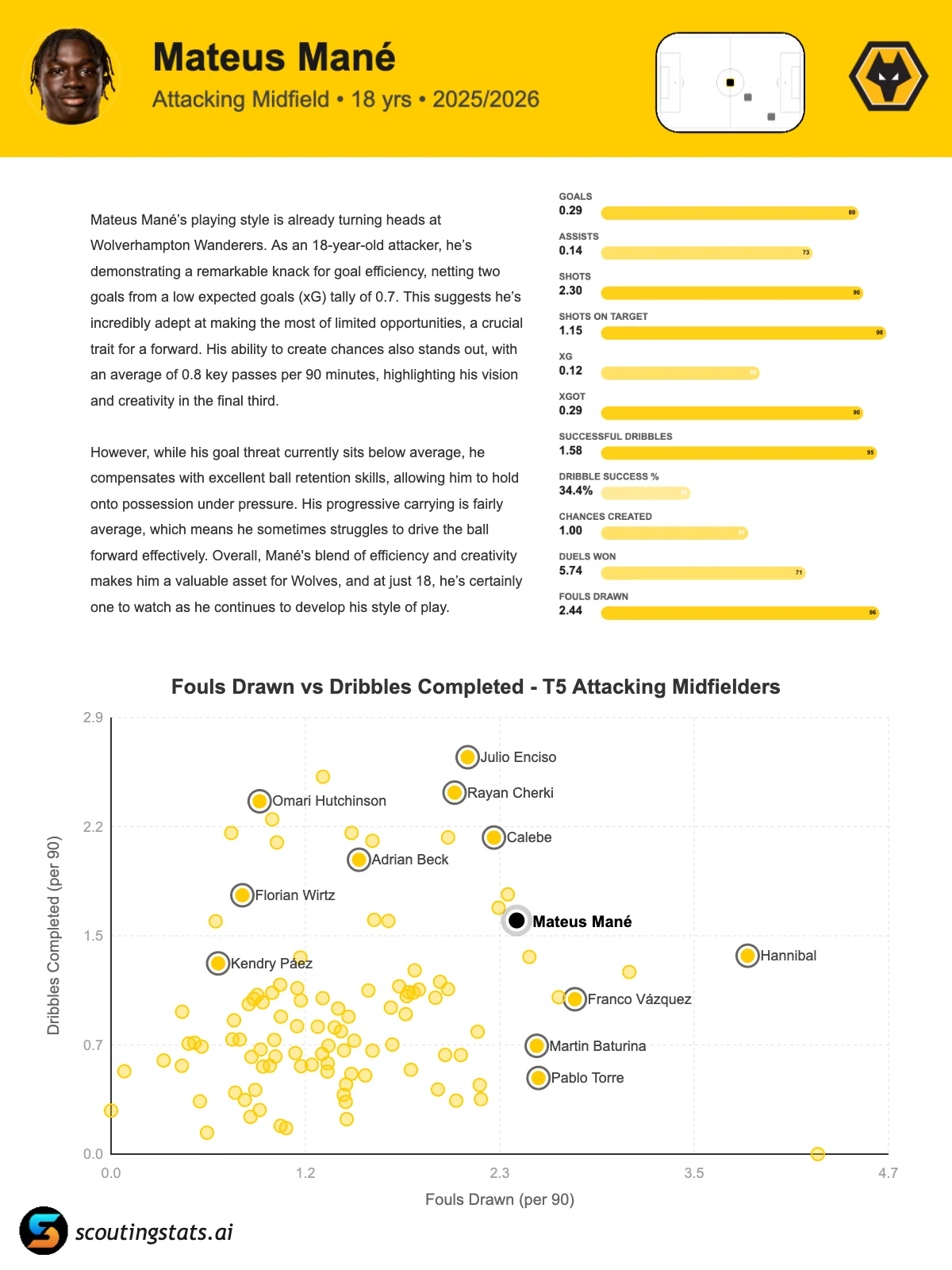
A football scouting report is a professional document used by scouts, analysts, and coaches to evaluate player performance. It typically includes player statistics, radar charts showing strengths and weaknesses, and recommendations.

How do I create a player scouting report?

Search for any player from our database of 150,000+ players, add radar charts and statistics using our drag-and-drop editor, customize colors and layout, then export to PDF or PNG.

Can I export my scouting report as a PDF?

Yes, all reports can be exported as high-quality PDF or PNG files, perfect for sharing with coaches, clubs, or including in presentations.

Is the Report Builder free to use?

Yes, free accounts can create and save 1 report with up to 2 pages. Premium subscribers get unlimited reports with up to 10 pages each.

Account Required

Log in or create a free account to use the Report Builder.

Custom Report

Understanding the Fields

  • Value: The raw stat (e.g., 15 goals, 2.3 xG, 87% pass accuracy)
  • Is %: Check if the value is already a percentage (affects display format)
  • Bar Fill: How the visual bar is filled - choose Percentile if you know the ranking, or Min/Max to set a custom scale

Don't have percentile data? No problem - use Min/Max to set a sensible range (e.g., Goals: 0-30). The bar will fill based on where the value falls in that range.

Used for per-90 calculations
Columns: Name* Value* Category Is% Percentile Min Max
(* = required, tab or comma separated)
Name The name of the stat as it will appear on the report (e.g., "Goals", "xG", "Pass Accuracy") Category Value The raw stat value. Can be a whole number (15), decimal (2.34), or percentage (87.5) Is % Check this if the value is already a percentage (e.g., Pass Accuracy 87.5%). This affects how it's displayed and ensures per-90 isn't calculated for it. Bar Fill Percentile: Use if you know the player's ranking (0-100) among peers.

Min/Max: Define a range to calculate bar fill. E.g., for Goals: min=0, max=30.
Percentile / Range Percentile (0-100): How the player ranks. 85 = better than 85% of players.

Range (Min-Max): The scale for this stat. Value will be shown as a proportion of this range.

Desktop Only Feature

The Report Builder requires a desktop or laptop computer for the best experience with our drag-and-drop editor.

Please visit this page on a larger screen to create reports.

Back to Home